Integrate your app
Register an app, sign users in through the hosted OpenID Connect page, or call the signed server API.
Your app connects to Yeap Verify in one of two ways:
| Way | Best for |
|---|---|
| Hosted sign-in page (OpenID Connect) | Apps that already support OpenID Connect. Verify shows the number and waits for the approval; your app gets an ID token |
| Server API | Apps where you add the second step yourself: push, TOTP or backup codes |
Both need an app registered in the team dashboard.
Register an app
- In the team dashboard, open Yeap Verify → Apps and click Add app.
- Enter a Name. Users see it in Yeap Verify when they approve a sign-in.
- For the hosted page, add your Redirect URIs, one per line. Optionally add a Webhook URL (HTTPS) to receive results.
- Click Save. The Client ID and Client secret are shown once. Store the secret on your server only.
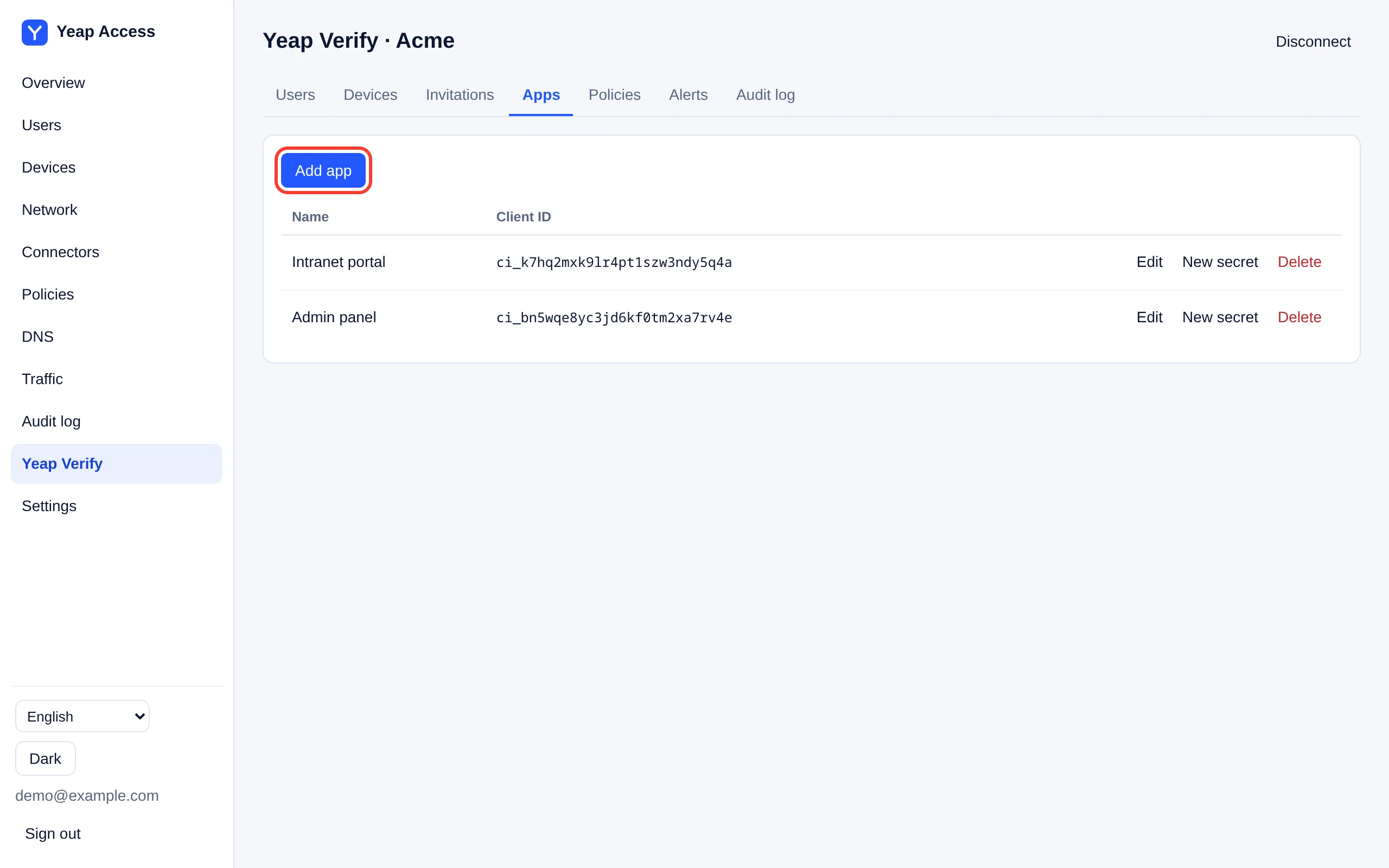
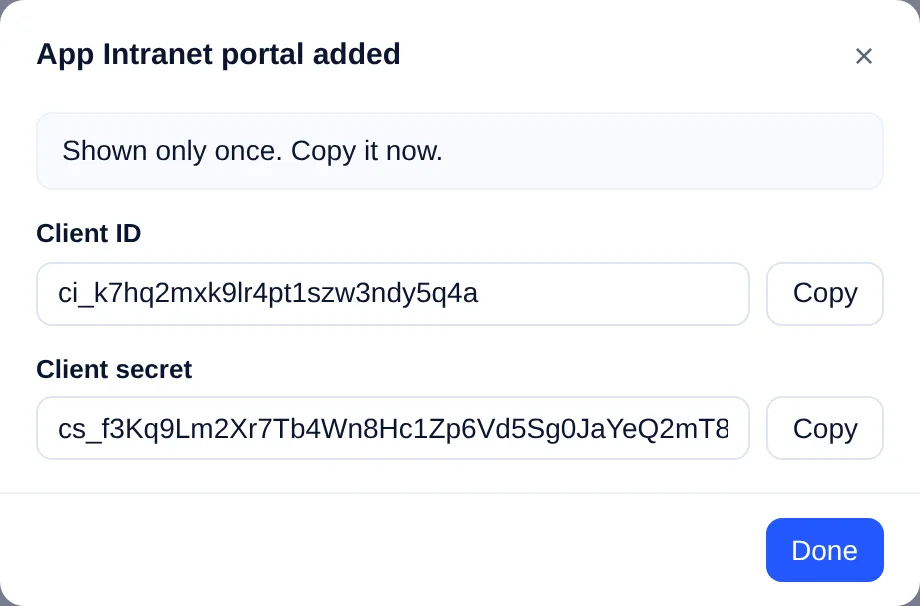
New secret replaces the secret; the old one stops working at once.
Under Yeap Verify → Policies, each app has two settings:
| Setting | Meaning |
|---|---|
| If Verify is down | Block (default) or Allow sign-ins when your app cannot reach Verify. Your app applies it; the server API's health check returns it |
| Number digits | How many digits the user enters: 3 to 6. Use more for sensitive apps |
Hosted sign-in page (OpenID Connect)
Your team's sign-in page is https://<team>.verify.yeap.cloud, which is also the issuer. Configuration is at https://<team>.verify.yeap.cloud/.well-known/openid-configuration.
| Flow | Authorization code with PKCE (S256). scope must include openid; state is required |
| Client authentication | client_secret_basic or client_secret_post |
| ID token | Signed with ES256. Claims include sub (the Verify user ID), preferred_username, amr and tx_id |
| Which user | Pass login_hint_token, a short-lived JWT your server signs (below). A plain login_hint is not accepted |
The user has already entered their password in your app, so you know who they are. Your server creates the login_hint_token as an HS256 JWT signed with the client secret:
{ "iss": "<client ID>", "aud": "https://acme.verify.yeap.cloud", "sub": "alice", "exp": <now + up to 300 seconds> }Then redirect the browser to https://acme.verify.yeap.cloud/oauth/v1/authorize with response_type=code, client_id, redirect_uri, scope=openid, state, nonce, code_challenge, code_challenge_method=S256 and login_hint_token. The page shows the number, and redirects back to your app with a code once the user approves on the phone. Exchange the code at the token endpoint listed in the configuration.
Server API
Base URL: https://verify.yeap.cloud. Every request is signed with the app's client secret.
| Header | Value |
|---|---|
Yeap-Client-Id | The app's client ID |
Yeap-Timestamp | Current Unix time in seconds. Must be within 5 minutes of the server's clock |
Yeap-Nonce | 16 to 64 random characters from A–Z a–z 0–9 _ -, new for every request |
Yeap-Signature | Hex HMAC-SHA256 with the client secret over the six lines below |
The signed text is these lines joined with \n: yeap-verify-hmac-v1, the method, the path with query string, the timestamp, the nonce, and the hex SHA-256 of the request body (of an empty body for GET).
Endpoints
| Request | Answer |
|---|---|
GET /api/v1/health | {"status":"ok","fail_mode":"closed"}. Call it before starting a sign-in |
POST /api/v1/auth | Starts a check. Body: user, factor (push, totp or backup, default push), optional ip and app (shown on the phone), passcode for TOTP and backup codes |
GET /api/v1/auth/{tx_id} | {"tx_id":…,"status":…} |
status is pending, then one of allow, deny, timeout or fraud (the user tapped This wasn't me). For push, the answer also has the number to show the user and expires_at. Poll every 1 to 2 seconds, or use the webhook. For totp and backup the answer is final at once.
Example (Python)
import hashlib, hmac, json, secrets, time
import requests

BASE = "https://verify.yeap.cloud"
CLIENT_ID = "ci_..."
SECRET = "cs_..."

def call(method, path, body=None):
    data = json.dumps(body).encode() if body is not None else b""
    ts, nonce = str(int(time.time())), secrets.token_urlsafe(24)
    text = "\n".join(["yeap-verify-hmac-v1", method, path, ts, nonce, hashlib.sha256(data).hexdigest()])
    headers = {
        "Yeap-Client-Id": CLIENT_ID, "Yeap-Timestamp": ts, "Yeap-Nonce": nonce,
        "Yeap-Signature": hmac.new(SECRET.encode(), text.encode(), hashlib.sha256).hexdigest(),
    }
    if body is not None:
        headers["Content-Type"] = "application/json"
    return requests.request(method, BASE + path, data=data, headers=headers, timeout=10).json()

tx = call("POST", "/api/v1/auth", {"user": "alice", "factor": "push", "ip": "203.0.113.7", "app": "Intranet portal"})
print("Enter this number in Yeap Verify:", tx["number"])
while (r := call("GET", "/api/v1/auth/" + tx["tx_id"]))["status"] == "pending":
    time.sleep(1.5)
print(r["status"]) # allow, deny, timeout or fraudErrors
| HTTP | error | Meaning |
|---|---|---|
| 401 | unauthorized, timestamp_out_of_window, replayed_request | Wrong signature or client ID, clock off by more than 5 minutes, or a reused nonce |
| 404 | user_not_found | No Verify user with that name |
| 429 | rate_limited | Too many requests for this user. Try again shortly |
| 503 | org_suspended and others, with "status":"unavailable" | Verify cannot answer, for example the plan expired. Apply your If Verify is down setting |
Webhook
If the app has a Webhook URL, Verify sends each final result as a POST with the JSON body {"event":"auth.result","tx_id":…,"status":…,"reason":…,"at":…}. It is signed the same way, with the headers X-Yeap-Client-Id, X-Yeap-Timestamp, X-Yeap-Nonce and X-Yeap-Signature, over your webhook URL's path. Check the signature before you trust it.