Domains
The free sites.yeapcloud.net address, buying a domain, connecting a domain on Yeap or elsewhere, HTTPS and the primary domain.
Every site has a free address under sites.yeapcloud.net. On a paid plan you can also serve it on your own domain, with a free HTTPS certificate issued automatically.
Open a site and click Domains.
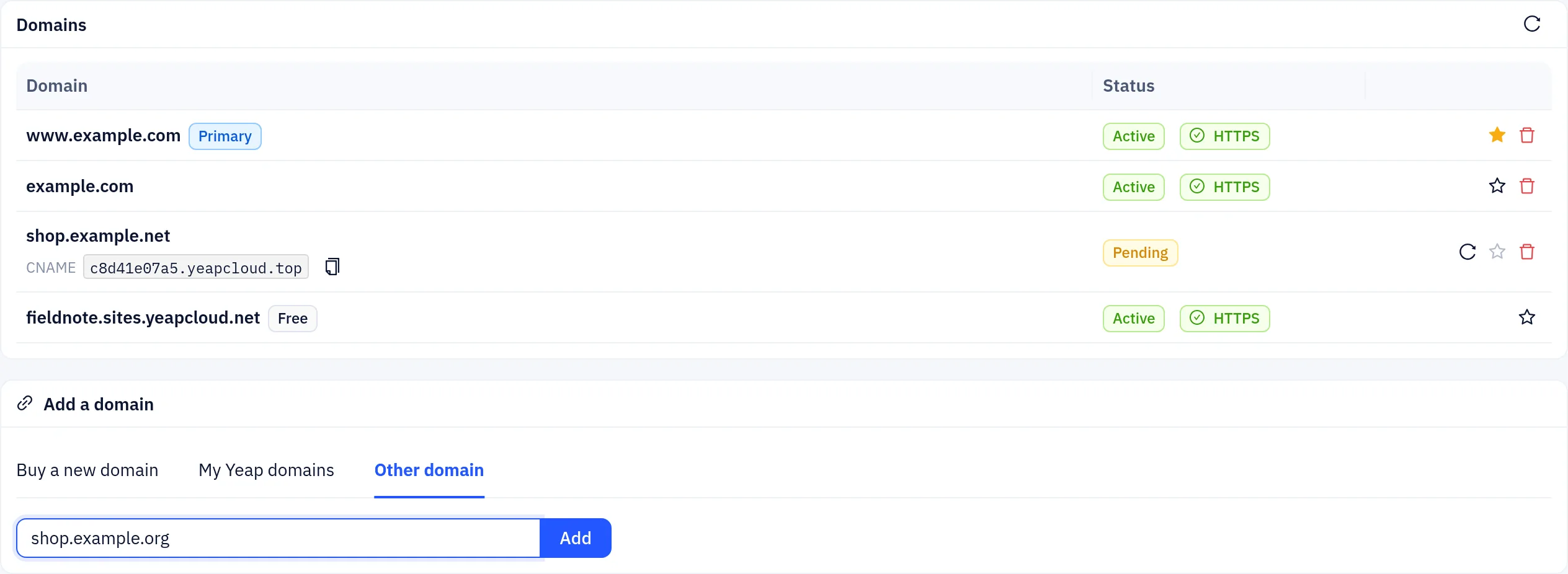
The Domains table lists every address of the site with its status and certificate. The free address is tagged Free. The Primary domain is the site's main address: once a domain of your own is primary, the other addresses (the free address and the www/apex twin) redirect visitors to it.
| Status | Meaning |
|---|---|
| Active | The domain points to the site and serves it |
| Pending | Waiting for your DNS record. Click Check now after you add it |
The status column also shows HTTPS when the domain's certificate is active, or Issuing certificate while it is being issued after the domain becomes active.
Your own domains need a paid Sites plan. The number of domains per site depends on the plan; www.example.com and example.com count as one.
Add a domain
The Add a domain card offers three ways.
Buy a new domain
- Open Buy a new domain. It searches for names based on your site name. Type another name to search again.
- Click Buy next to an available domain. It is added to your cart.
- Pay the order. The domain is connected to the site automatically after registration, with both
wwwand the apex. Until then it shows as Connecting after purchase…
For pricing and registration details, see Domain registration.
A domain you already have on Yeap Cloud
My Yeap domains lists domains you registered with Yeap Cloud or host on Yeap DNS. Click Connect. The DNS records are created for you, for both www and the apex. If a domain you registered here uses DNS elsewhere, it is switched to Yeap DNS first. Domains in use by another of your sites show In use.
Any other domain
Open Other domain, enter the hostname, for example
www.example.comorshop.example.com, and click Add.The table shows a CNAME target for it. At your DNS provider, add a CNAME record:
textwww.example.com. CNAME <target shown in the console>Click Check now (the refresh icon). Once the record is visible, the domain becomes Active and the certificate is issued.
DNS changes can take from a few minutes to a few hours, depending on the old record's TTL. If a domain stays pending for 3 days, another account may claim the hostname.
Most DNS providers do not allow a CNAME on the apex (example.com). Either host the domain's DNS on Yeap DNS, which flattens the record for you (My Yeap domains does this in one click), or use www.example.com and redirect the apex at your provider.
Make a domain primary
Click the star next to an active domain to Make primary. It becomes the site's main address, and the site's other addresses redirect to it.
Remove a domain
Click the delete icon next to one of your domains. The free address cannot be removed. If you remove your primary domain, the free address becomes the main address again.