Buckets and public access
Upload and share objects, make a bucket public through the CDN, add a custom domain, and set CORS and a quota.
Open a bucket from Storage → Object Storage → Buckets. The bucket page has two tabs: Objects for the files, and Settings for public access, custom domains, the endpoint, CORS, the quota and deleting the bucket.
Work with objects
The Objects tab lists folders and files under the current path. Click a folder to open it, and use the path at the top to go back.
- Upload: upload files, or drag files and folders onto the list.
- New folder: create an empty folder.
- On each file: Download, Open (view in the browser), Copy link and Delete.
- Select several rows to delete them together. Deleting a folder deletes everything in it.
Share a private file
Copy link creates a signed link that works without a key, valid for 1 hour, 1 day or 7 days. Anyone with the link can download the file until it expires. The bucket stays private.
Make a bucket public
On the Settings tab, turn on Public access. Anyone with the URL can then read the bucket's objects, without signing. Public buckets are served through our CDN, with HTTPS.
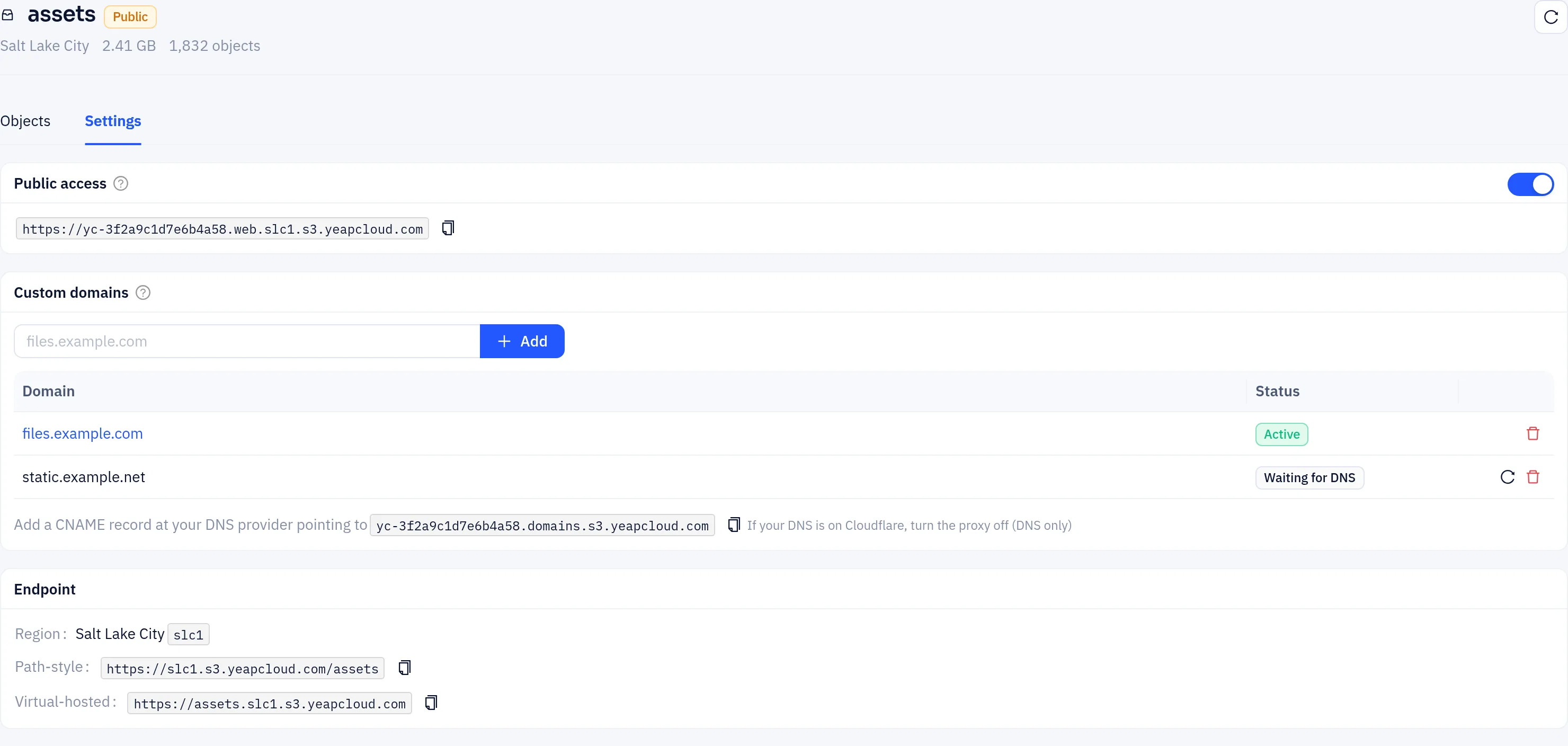
The card shows the bucket's public URL. Its hostname belongs to this bucket only. An object images/logo.png is at https://<public hostname>/images/logo.png.
- Only
GETandHEADare served. Uploads and deletes still need a key. - A request for
/or for a folder returns itsindex.html, so a bucket can host a static website. There are no directory listings. - Objects are cached on the CDN for up to an hour. Uploads and deletes made in the console clear the cache for those files. Changes made through the S3 API are not cleared, so an overwritten file can be served from cache for up to an hour.
Turn Public access off to make the bucket private again. The public hostname stops working.
Use your own domain
Under Custom domains, you can serve a public bucket on your own hostname, such as files.example.com, with a free certificate.
- Enter the hostname and click Add.
- At your DNS provider, add a CNAME record for that hostname pointing to the target shown under the list (it ends in
.domains.s3.yeapcloud.com). Click the copy icon to copy it.- If the parent zone is hosted in Yeap Cloud DNS on the same account, the record is added for you.
- If your DNS is on Cloudflare, turn the proxy off (DNS only).
- Wait. The status moves from Waiting for DNS to Issuing certificate to Active. The page refreshes on its own. Click Check now to check right away.
When the domain is Active, the hostname is a link to the bucket. Delete a domain with its delete icon.
A hostname waiting for DNS is checked for about 7 days. After that, remove it and add it again. If the status is Error, the message under it says why.
Endpoint
The Endpoint card shows the bucket's region and its addresses for S3 clients:
- Path-style:
https://slc1.s3.yeapcloud.com/<bucket> - Virtual-hosted:
https://<bucket>.slc1.s3.yeapcloud.com
CORS
CORS rules let web pages on other sites call the bucket from the browser, for example to upload with a presigned URL.
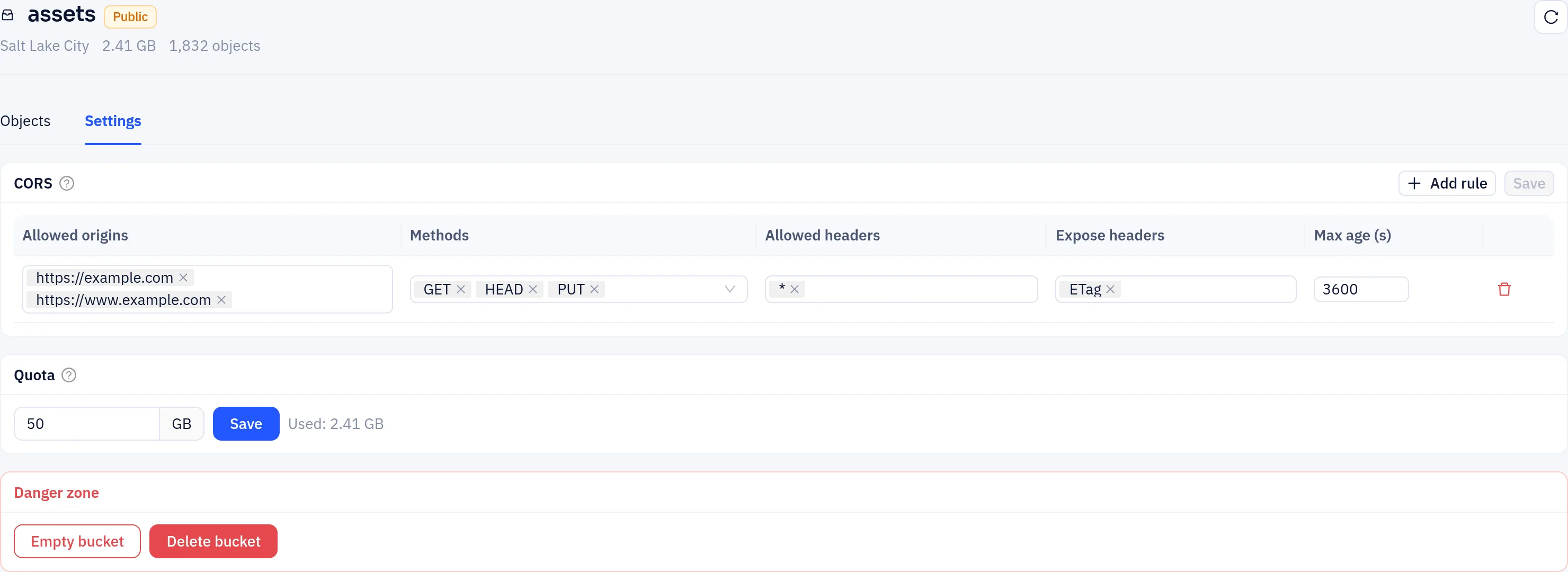
Click Add rule, fill in the fields, and click Save:
| Field | Description |
|---|---|
| Allowed origins | Sites allowed to call the bucket, such as https://example.com, or * for any |
| Methods | GET, HEAD, PUT, POST, DELETE |
| Allowed headers | Request headers the browser may send, or * |
| Expose headers | Response headers scripts may read, such as ETag (needed for multipart uploads) |
| Max age (s) | How long browsers cache the answer, up to 86400 |
Keys with the Admin permission can also change CORS through the S3 API.
Quota
Set Quota in GB to cap the bucket's size. Uploads are rejected once the bucket reaches it. 0 means no limit.
Lifecycle rules and unsupported features
There is no console page for lifecycle rules (for example, deleting objects after 30 days). Set them through the S3 API with an Admin key.
Versioning, object lock, bucket policies and per-object ACLs are not supported.
Empty or delete a bucket
In Danger zone:
- Empty bucket deletes every object in the bucket.
- Delete bucket deletes the bucket. It must be empty first.
Both ask you to type the bucket name to confirm. Deleted data can't be recovered. Deleting a bucket also removes its public hostname and custom domains.