Referral program
Share your referral link and earn a share of what referred users pay for 12 months, paid into your balance after a 30-day hold.
Invite people to Yeap Cloud with your referral link and earn a commission on what they pay. Commissions are paid into your account balance.
How it works
- You share your referral link.
- Someone opens the link and signs up within 60 days, by email or with Google or GitHub. Their account is linked to yours.
- The new user gets a welcome coupon in their wallet (currently $5 off an order of $10 or more, valid for 30 days).
- For 12 months after they sign up, you earn a share of what they pay:
| What they pay | Your commission |
|---|---|
| Invoices for any product (plans, renewals, add-ons), whether paid by card or from their balance | 10% |
| Domain registrations, renewals and transfers | 3% |
| Balance moved to their LLM API account | 10% |
Balance top-ups do not earn a commission by themselves. The money counts when it is spent on an invoice or moved to the LLM account.
- Each commission is Pending for 30 days. If the invoice is refunded or voided in that time, the commission is Reversed. Otherwise it is added to your account balance and shows as Paid.
The current rate, period and holding time are always shown in the tooltip next to Your referral link.
Your referral page
Go to Billing → Referral program.
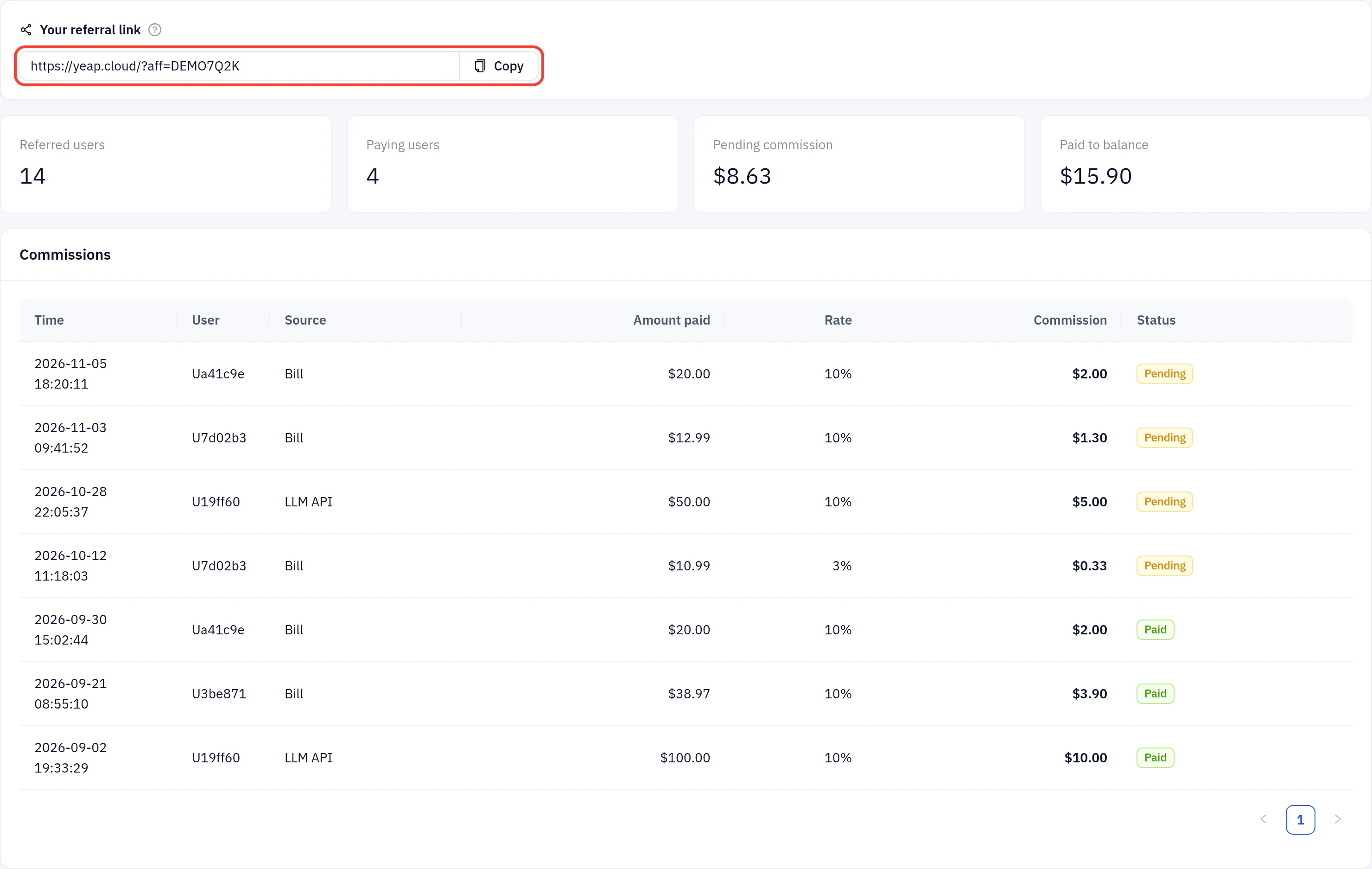
- Your referral link: click Copy and share it on your site, in a newsletter or with friends. The link points to the Yeap Cloud home page with your code, for example
https://yeap.cloud/?aff=DEMO7Q2K. - Referred users: accounts that signed up through your link.
- Paying users: referred accounts that have earned you at least one commission.
- Pending commission: commissions still in the 30-day holding period.
- Paid to balance: commissions already added to your balance.
The Commissions table lists every commission with its time, the referred user (shown as an anonymous ID such as Ua41c9e), the source (Bill or LLM API), the amount they paid, the rate, your commission and the status. Hover over a Pending status to see the date it reaches your balance.
Rules
- Commissions are in US dollars and go to your account balance. You can use the balance to pay invoices. See Billing and invoices.
- Signing up your own accounts through your link does not earn commissions.
- A user can only be referred once, when their account is created. Existing accounts cannot be linked later.
- If the page says The referral program is paused, new commissions are not recorded until it resumes.